Try each feature
Publish events and take RSVPs
Create a Wix event in wp-admin, show it on your site's calendar, and let guests RSVP on the event page.
Events live in Wix. You create them in wp-admin, and every save goes to Wix first. Selling plans? See Sell pricing plans.
Install Wix Events
Open Wix → Manage Apps
Find Wix Events. If it says Not installed, click Install. It takes a few seconds, and an Events menu appears in the sidebar.

Publish an event
Open the setup guide
Events → Setup Guide walks you through calendar views, date format, an organizer and a venue. They’re all optional. You can publish an event right away.

Fill in the event
Go to Events → Add New. Give it a name, a start and end time, a venue and an address. Write the description in the editor and a one-line summary in Excerpt.

Publish the event
Click Publish. The event is created in Wix Events and published there with RSVP open. Save Draft creates it in Wix as a draft instead.
Open the calendar
Open /events/ on your site, or click View calendar at the top of any Events screen. Visitors can search, filter by date or registration type, and switch between List, Month, Week, Day and Photo views.

To put the calendar on another page, use [wix_events_calendar]. For a simple list, use the Wix Events block or [wix_events].
Open the event page
Each event has its own page with the date, venue, an RSVP button, Add to calendar and a map link.
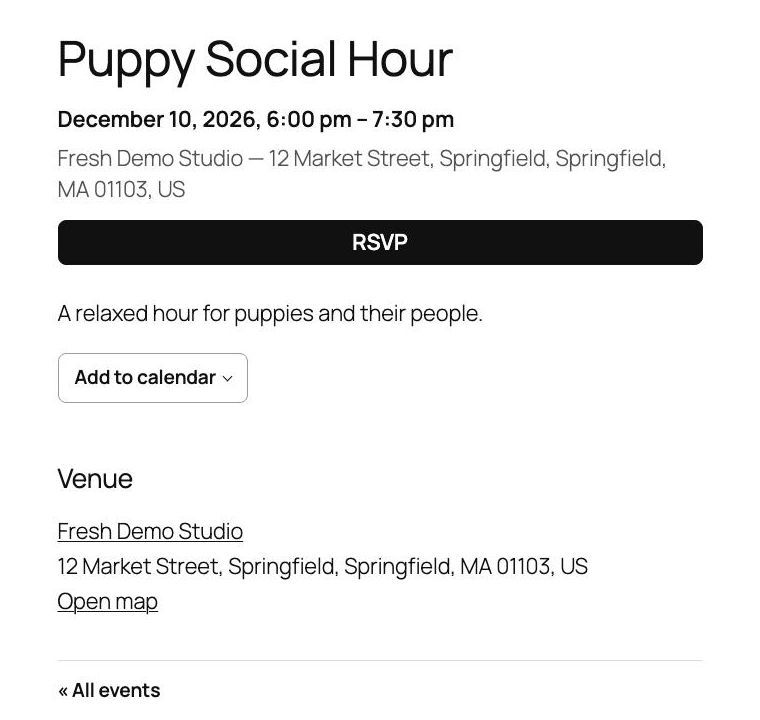
RSVP as a guest
Click RSVP
A short form opens on the page: first name, last name and email. Guests don’t need an account.

Confirm the RSVP
Click Confirm RSVP. The guest sees a confirmation on the page, and Wix emails them. The guest appears in Wix Events under the event’s guest list.

If something goes wrong
Can I trash a published event?
No. Wix has no way to take a published event back to a draft, so WordPress refuses. Cancel the event in Wix instead, which also tells its guests.
Can I sell tickets instead of taking RSVPs?
Events created in wp-admin use RSVP. To sell tickets, set up the tickets on the event in Wix. Ticketed events then show their prices and a Get tickets button on your site.
The event says "Sold out" but it only takes RSVPs
That was a bug in 1.26.12 and earlier, fixed in 1.26.13. Update the plugin and click Sync now on Wix → Settings → Content Sync.