Try each feature
Sell pricing plans
Create a membership plan with a free trial in wp-admin, show it on a page, and let members buy it through Wix checkout.
Plans live in Wix. You create them in wp-admin, and every save goes to Wix first. Running events? See Publish events and take RSVPs.
Install Wix Pricing Plans
Open Wix → Manage Apps
Find Wix Pricing Plans. If it says Not installed, click Install. A Pricing Plans menu appears in the sidebar.

Create a plan
Add a plan
Go to Pricing Plans → All Plans → Add New Plan. Give it a name and a one-line description.
Set the price
Under Plan pricing, set the price, how often it renews (for example every 1 month), an optional free trial and the perks, one per line. A price of 0 makes a free plan, which doesn’t renew.

Publish the plan
Click Publish. The plan is created in Wix Pricing Plans and can be bought right away.
Show your plans on a page
Create a page with the Wix Pricing Plans block or [wix_plans]. Each plan shows as a card with its price, renewal, trial and perks.
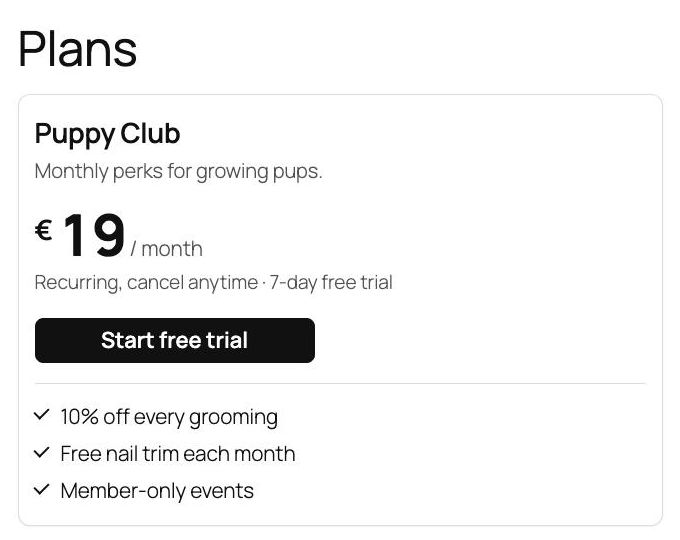
To compare plans side by side, use the Wix Pricing Plans Comparison block or [wix_plan_compare].
Buy a plan as a member
Start the checkout
Click Start free trial (or Buy, for a plan without a trial). Signed-out visitors sign in or create an account first, then go on to Wix’s secure plan checkout. Back on your site they see “Thanks for your order!” with the plan and, for a trial, when it ends.
Find the order in wp-admin
Pricing Plans → Plan orders lists every plan members bought or joined, with its status and next payment.
Restrict content to plan members
Any page, post, event or product has a Member access box. Tick Restrict this content and Members with any active plan, and only members with a paid or trial plan can see it. Everyone else sees a message or is sent to your join page. See Let visitors become members for the rest of the access options.
If something goes wrong
"Start free trial" takes me to a sign-in page
That's expected when you're signed out. Plans belong to a member, so the visitor signs in or creates an account first and then continues to checkout.